
LIVE
A multifunctional, central platform for your day. Podcasts, AI agents and a rail of panels, from Messages and Calendar to Finance and Grok, together in one native Mac window.
How it works: Try it free for 14 days. When the trial ends, the app asks you to buy, with checkout through Lemon Squeezy.
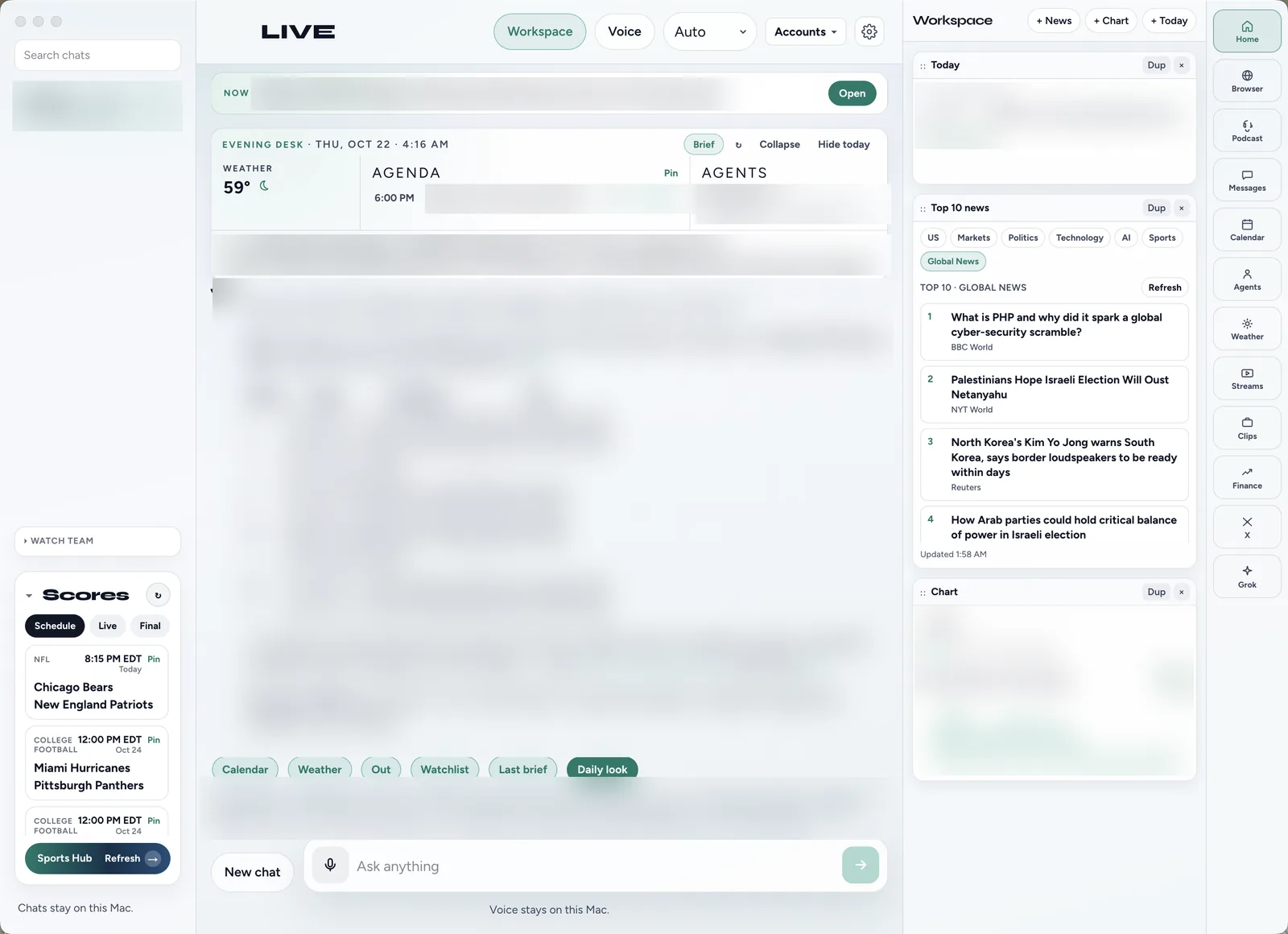
Grok at the center of your day.
Sign in with SuperGrok, and LIVE puts Grok to work across everything on your screen.
Grok chat
Ask anything and pick Auto or a specific Grok model. Your chats are listed, searchable and kept on your Mac.
Daily look
One tap and Grok pulls in your calendar, weather, leave-by time, watchlist and your last brief. You get a short, practical look at the day ahead.
Ask LIVE about any page
In the built-in browser, Ask LIVE sends the page you’re reading to Grok, so you can ask about it right where you are.
AI agents
Missions that scan, watch and brief you, written by Grok. They can keep running in the background from your menu bar.
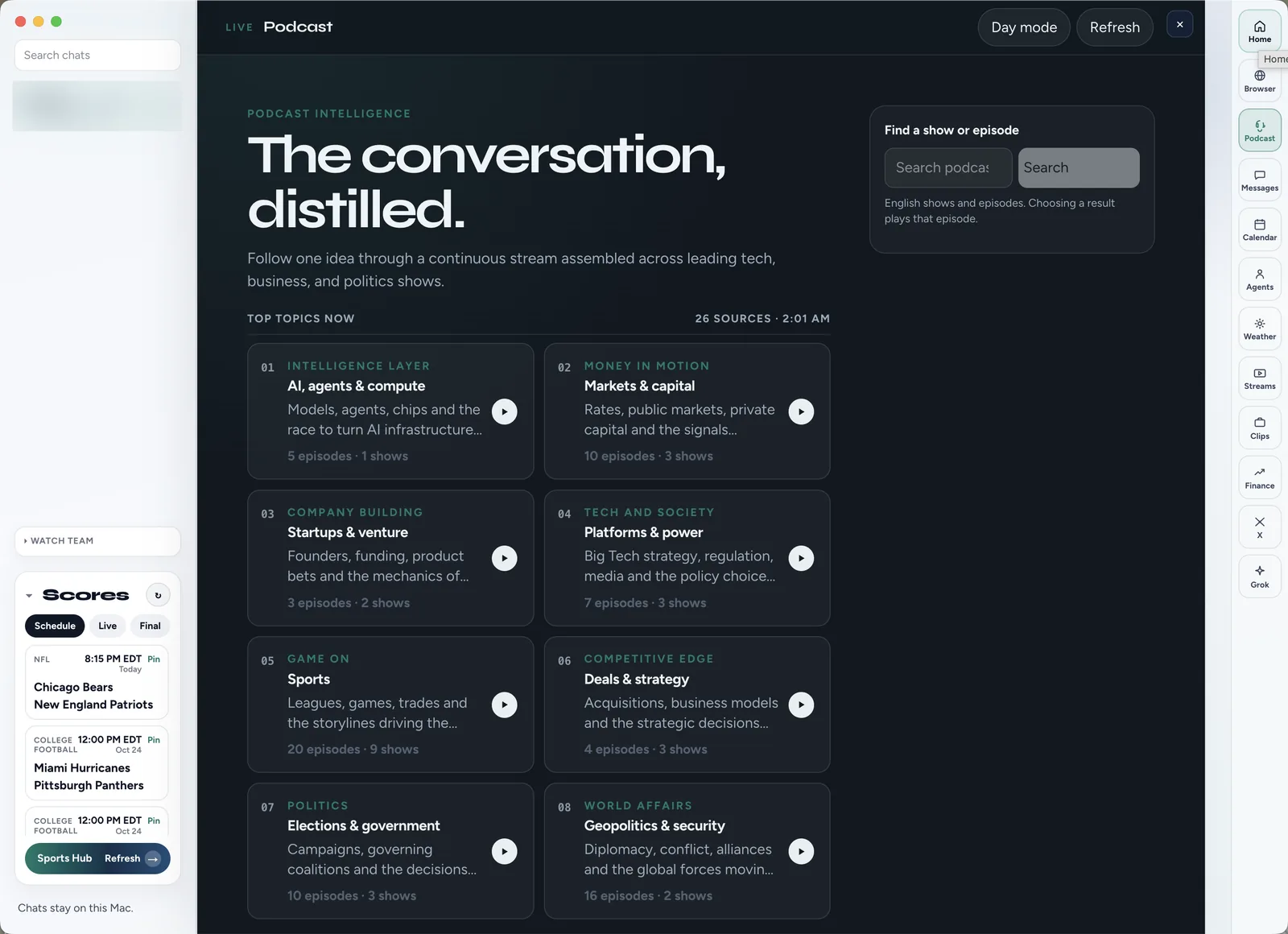
The conversation, distilled.
LIVE follows the top topics in leading tech, business, sports and politics shows: AI and compute, Markets, Startups, Platforms, Sports, Deals, Elections and Geopolitics. Pick a topic and listen to one continuous stream of the latest episodes, or search for any show or episode. A clean player lets you skip back 15 seconds, jump ahead 30, change speed and see what’s next in the queue.
Mission control, powered by Grok.
Turn on the missions you want, and Grok does the reading. Morning Command Brief covers world and market news plus your tickers. Tech Trends Radar ranks what’s breaking in tech and AI. Watchlist Alerts flags big moves and keyword hits and explains why. Meeting Prep reads your upcoming Apple Calendar events and briefs you before each one. Run them every hour, every 6 hours, every morning or by hand.
Everything, one click away.
A rail down the right side puts Home, Browser, Podcast, Messages, Calendar, Agents, Weather, Streams, Clips, Finance, X and Grok one click away. Hide what you don’t use and keep the order that works for you. Press ⌘1 to ⌘9 to jump to a panel, or ⌘K to open the command palette.
Everything LIVE does.
Podcasts
Follow the top topics across leading tech, business, sports and politics shows as one continuous stream. Search any show or episode, and use a player with skip, speed and a queue.
Agents
Missions written by Grok: Morning Command Brief, Tech Trends Radar, Watchlist Alerts and Meeting Prep. Set each to run hourly, every 6 hours, every morning or by hand. Enabled missions keep running in the background from your menu bar.
The panel rail
Home, Browser, Podcast, Messages, Calendar, Agents, Weather, Streams, Clips, Finance, X and Grok sit on one rail. Hide what you don’t need and jump with ⌘1 to ⌘9.
Grok chat
Sign in with SuperGrok and chat with Grok in the center of LIVE. Choose Auto or a specific Grok model.
Daily look
One tap asks Grok for a short look at your day. It draws on your calendar, weather, leave-by time, watchlist and last brief.
Ask LIVE about any page
Browse the web inside LIVE and send the page you’re on to Grok. Ask questions without copying and pasting.
Voice
Tap the mic to talk to LIVE instead of typing, and LIVE can read answers aloud. Voice stays on this Mac.
Home and Workspace
Home shows what’s next, plus a desk with weather, your agenda and agent notes. The Workspace column holds cards you add, like Today, Top 10 news and stock charts.
Messages (iMessage)
LIVE reads your Messages history from this Mac, so your conversations show up in LIVE. Sending goes through the Messages app. Both need your permission in macOS settings.
Calendar
LIVE syncs live with Apple Calendar on your Mac. You can also add Google or Outlook through an ICS subscribe link, or import an .ics file.
Weather
A full forecast panel with a radar map. The weather for your next event also shows up on Home and in your daily look.
Streams
Pick a category and LIVE scans podcasts for fresh cuts. It builds 7 to 10 timed streams for that lane.
X Clips
Pick a lane like Business, Tech, Markets or AI, and LIVE finds the top video clips on X right now. Playback and live counts come straight from X.
Finance TV
Live finance coverage first, then today’s shows and the latest episodes. Charts for the tickers you follow can sit on Home.
X
The X panel brings X search into LIVE. Keep up with X without a separate app.
Browser
A built-in browser with bookmarks, pinning and Ask LIVE. Open links without leaving the app.
Scores and Sports Hub
Scores sit in the sidebar with Schedule, Live and Final tabs. Pin a game, refresh, or open Sports Hub for more.
Watch Team
A Watch Team card sits in the sidebar above Scores. Open it to keep your team close at hand.
Chats stay on this Mac
Your chats are listed and searchable in the sidebar. They stay on your Mac.
Night mode
Switch to Night mode from the header whenever you like. Panels like Podcast have their own day and night look.
Keyboard first
⌘K opens the command palette, ⇧⌘H goes Home and ⇧⌘L starts a daily look. ⌘1 to ⌘9 jump straight to a panel.
Built for the Mac.
A native app for the big screen.